B3. Preparations🔗
In brief🔗
A preparation is an intermediate product made in the kitchen from raw ingredients (for example a curry-marinated chicken). The Preparations screen describes its recipe, its yield (quantity obtained) and its cost, and lets you track the lots (production runs carried out).
Who / when🔗
For the chef and the manager. Use it whenever a dish relies on a base prepared in advance, and every time a lot is produced in the kitchen.
How to get there🔗
Kitchen & Recipes → Preparations
Prerequisites🔗
🔑 View stock (read-only) · Manage production (creating preparations, applying lots)
Screen tour🔗
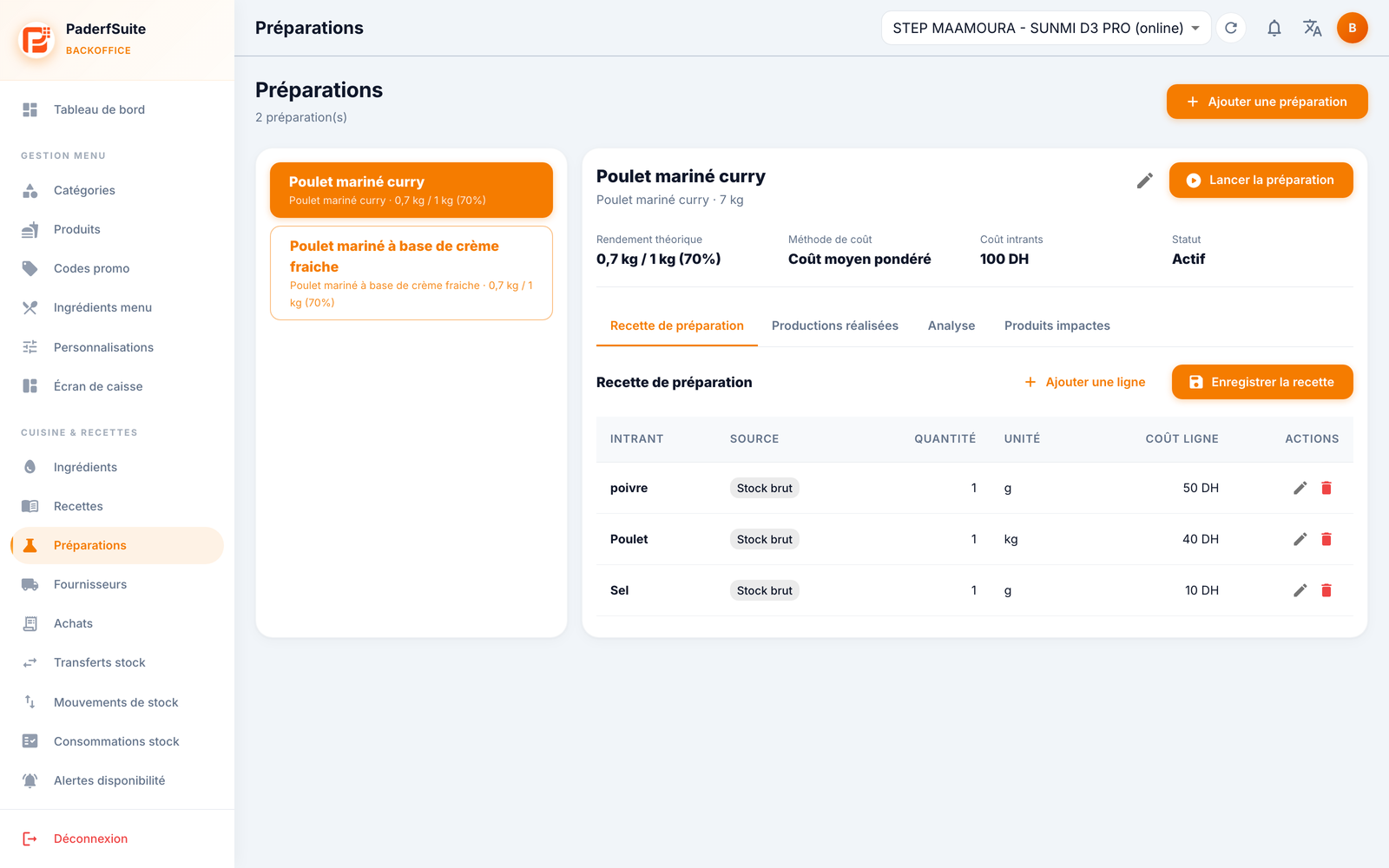
The screen is split in two: the list of preparations on the left, the details of the selected preparation on the right. The Add preparation button is at the top right.
The details show in the header the theoretical yield (e.g. 0.7 kg / 1 kg (70%)), the cost method (e.g. weighted average cost), the input cost (in DH) and the status (Active). The Launch preparation button records a production run.
The details include four tabs:
- Preparation recipe: the input lines, with input, source (raw or prepared stock), quantity, unit and line cost. Add line and Save recipe buttons.
- Production history: the history of the lots produced.
- Analysis: the cost and yield analysis.
- Impacted products: the products that use this preparation.
Step-by-step procedures🔗
Create or edit a preparation🔗
Click Add preparation (or the pencil icon). The dialog asks for:
- the main ingredient;
- the name;
- the yield;
- the extra ingredients;
- the cost method;
- the shortage policy (what to do when unavailable);
- the Active toggle.
Add a recipe line🔗
Through Add line, the dialog asks for the source (raw stock / preparation), the ingredient, the quantity and the unit. Remember to Save recipe.
Launch a production (apply a lot)🔗
Click Launch preparation. Fill in the planned quantity, the actual quantity obtained and any notes. The lot then appears in Production history.
Messages & edge cases🔗
- Confirm unavailable: if a preparation cannot be produced, you can mark it unavailable; the shortage policy set on the preparation then defines the behavior.
- The yield explains why 1 kg of inputs can give less finished product: this is normal (cooking, trimming).
Tips🔗
- Set a realistic yield: it determines the accuracy of the cost and the stock.
- Enter the actual quantities for each lot to refine the weighted average cost.