PaderfSuite
Back to the help centre

PADERFSUITE GUIDES

View categories in the BackOffice

Find menu categories and their visibility states.

Detailed manuals and practical procedures for all eight activities. Available functions depend on your installation’s profile, modules and permissions.

Before you start

A connection to the register’s BackOffice and restaurant catalogue management permissions.
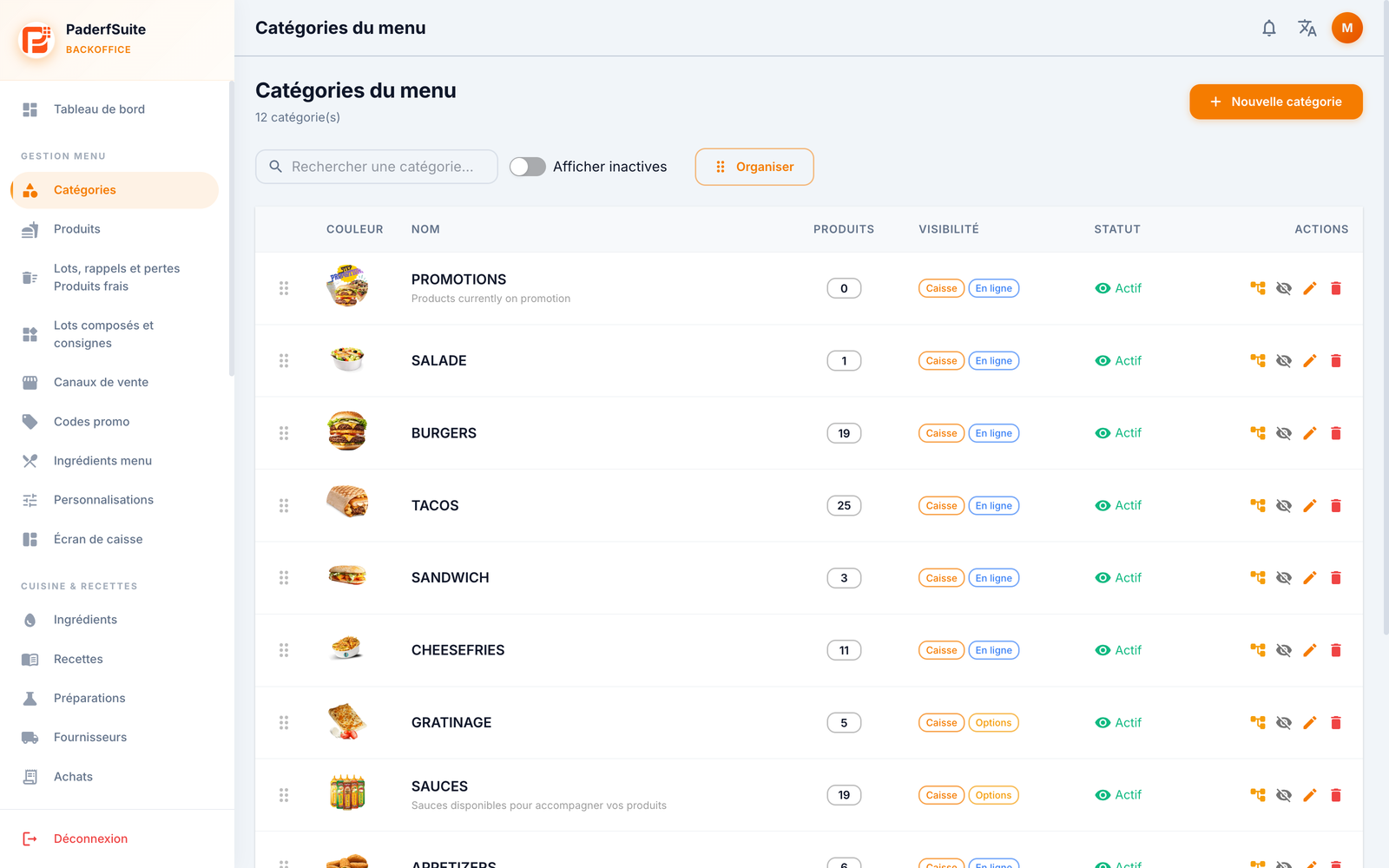
POSBackOffice category table with search and visibility states.Enlarge screenshot
Actual screenshot · French interface · September 2026 · 3200 × 2000
Open original-size image
POSBackOffice category table with search and visibility states.

Steps to follow

  1. Under Menu management, open Categories.
  2. Use Search for a category to narrow the list.
  3. Enable Show inactive if the category is no longer active.
  4. Review Products, Visibility and Status to identify the category.

What to remember

Showing inactive items is a viewing filter; it does not reactivate them. Visibility changes must be made on the relevant category.

Back to the help centre